

Common Website Security Threats: What Every Site Owner Should Know
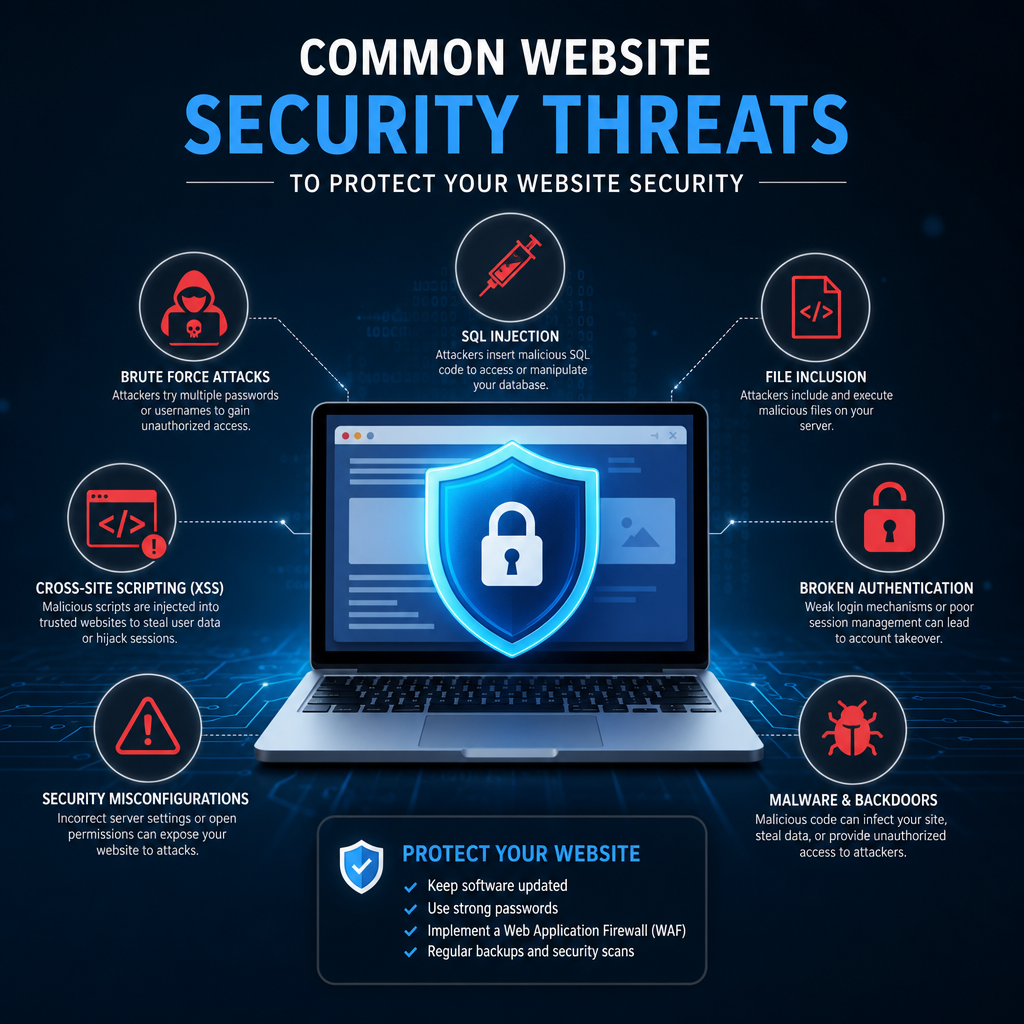
Website security is no longer just a concern for large companies or technical teams. Whether you run a small business site, a personal blog, or a growing eCommerce store, your website can become a target. Attackers often look for weak passwords, outdated software, insecure forms, or overlooked plugins. The result can be stolen data, damaged reputation, lost revenue, and even a full site takeover.
Understanding the most common threats is the first step toward building stronger website security. Once you know what to look for, you can make smarter choices about updates, access control, backups, and monitoring. Below are the threats that show up most often and the practical ways to reduce your risk.
Why Website Security Matters
A compromised website can cause problems far beyond temporary downtime. Visitors may see warning messages from browsers, customer data may be exposed, and search engines may flag your site as unsafe. In some cases, attackers use hacked sites to send spam, distribute malware, or launch further attacks.
For businesses, poor website security can lead to:
- Loss of trust from customers
- Search engine ranking drops
- Revenue loss from downtime or blocked transactions
- Legal or compliance issues if sensitive data is exposed
- Expensive cleanup and recovery work
The good news is that many attacks are preventable with consistent maintenance and security best practices.
1. Malware Infections
Malware is malicious software designed to damage, disrupt, or gain unauthorized access to systems. On websites, malware can take many forms, including backdoors, spyware, ransomware, and malicious redirects. Attackers often inject malware into files, databases, themes, or plugins to keep access hidden.
How it happens
Common entry points include:
- Outdated content management systems
- Vulnerable plugins or themes
- Weak admin passwords
- File upload forms without proper validation
- Infected third-party scripts or dependencies
Signs of malware
You may notice:
- Strange pop-ups or redirects
- A sudden drop in search traffic
- Unfamiliar files on the server
- Browser warnings for visitors
- Unusual server activity or resource spikes
Example
A small business site running outdated WordPress plugins may be infected through a known vulnerability. The attacker adds a hidden script that redirects visitors to a phishing page. The owner may not notice for days, but the site can quickly lose trust and traffic.
Prevention tips
- Keep all software updated
- Use trusted plugins and themes only
- Scan your website regularly
- Remove unused files and extensions
- Limit file upload permissions
2. Phishing Attacks
Phishing attacks trick users into revealing sensitive information such as passwords, payment details, or account credentials. Sometimes the phishing page is hosted on a compromised website, while in other cases attackers use fake login forms that look identical to the real thing.
How it happens
Attackers may:
- Clone a login page
- Send fake account verification emails
- Use compromised contact forms to distribute malicious links
- Insert phishing redirects into a hacked website
Why it works
Phishing is effective because it relies on trust and urgency. A message might claim your account will be suspended unless you log in immediately. Visitors or staff may respond quickly without checking the details.
Example
An online store owner receives an email that appears to come from their payment processor. The email asks them to “confirm account details” using a login link. The page looks legitimate, but it is a fake site designed to steal credentials.
Prevention tips
- Educate staff and contributors about suspicious links
- Use two-factor authentication
- Verify requests through official channels
- Add branded email authentication such as SPF, DKIM, and DMARC
- Make login URLs and admin access more difficult to guess
3. Brute Force Attacks
A brute force attack is an attempt to guess login credentials by trying many combinations of usernames and passwords. Automated tools can test thousands of guesses per minute, especially against common usernames like “admin” and weak passwords.
How it happens
Attackers target:
- WordPress admin logins
- Hosting control panels
- FTP accounts
- Email accounts tied to the site
Why it’s dangerous
If attackers succeed, they can change site content, install malware, create new user accounts, or lock the owner out entirely. Even unsuccessful attempts can slow down a website and create unnecessary server load.
Example
A blog uses a simple password and the default admin username. A bot repeatedly tries login combinations until it succeeds, then installs a malicious plugin that gives the attacker persistent access.
Prevention tips
- Use strong, unique passwords
- Enable two-factor authentication
- Limit login attempts
- Change default usernames where possible
- Monitor login activity for unusual patterns
4. Cross-Site Scripting (XSS)
Cross-site scripting, or XSS, happens when attackers inject malicious scripts into a web page that other users then load in their browsers. These scripts can steal cookies, redirect visitors, or alter page content.
How it happens
XSS often exploits:
- Comment fields
- Contact forms
- Search boxes
- User profile pages
- Vulnerable plugins or custom code
Types of XSS
There are several forms of XSS, but the most common are:
- Stored XSS: The malicious script is saved on the site and served to users later
- Reflected XSS: The script appears in a request and is reflected back immediately
- DOM-based XSS: The issue occurs in client-side code in the browser
Example
An attacker posts a comment containing hidden JavaScript. When other visitors view the page, the script runs in their browsers and can capture session information or redirect them to a fraudulent login page.
Prevention tips
- Validate and sanitize all user input
- Escape output before displaying it
- Keep plugins and themes updated
- Use security headers like Content Security Policy
- Avoid custom code unless it is properly reviewed
5. SQL Injection
SQL injection occurs when attackers manipulate database queries through unsafe input fields. If a site does not properly filter user input, a malicious request can trick the database into revealing, changing, or deleting data.
How it happens
SQL injection often targets:
- Search boxes
- Login forms
- URL parameters
- Contact forms
- Checkout pages
What attackers can do
Depending on the flaw, attackers may:
- Read customer records
- Modify site content
- Delete databases
- Bypass authentication
- Extract usernames and passwords
Example
A vulnerable form on a membership website accepts raw input in a database query. An attacker enters a crafted statement that exposes user account details stored in the database.
Prevention tips
- Use prepared statements and parameterized queries
- Sanitize and validate all input
- Restrict database permissions
- Keep server-side code secure and reviewed
- Use trusted frameworks that support safe database access
6. Distributed Denial-of-Service (DDoS) Attacks
A DDoS attack overwhelms a website with massive traffic from multiple sources, making it slow or unavailable to legitimate users. The attack may not steal data, but it can disrupt service and hurt revenue.
How it happens
Attackers use botnets, which are networks of compromised devices, to flood a site with requests. The target’s server, network, or application layer becomes overloaded.
Signs of a DDoS attack
- Very slow loading times
- Intermittent outages
- Server resource exhaustion
- Sudden spikes in traffic from unusual locations
- Increased error messages
Example
An eCommerce store launches a seasonal sale, and shortly after, it experiences a DDoS attack. Customers cannot check out, support tickets flood in, and the business loses sales during a critical period.
Prevention tips
- Use a content delivery network with DDoS protection
- Choose hosting that includes traffic filtering
- Enable rate limiting
- Monitor traffic patterns in real time
- Have an incident response plan ready
7. Outdated Software and Plugin Vulnerabilities
One of the most common website security issues is simply failing to update software. Vulnerabilities in content management systems, themes, plugins, and server software are frequently discovered and published. Attackers actively scan the web for sites running vulnerable versions.
Why updates matter
Updates often include:
- Security patches
- Bug fixes
- Compatibility improvements
- Performance enhancements
If updates are delayed, attackers may exploit known flaws before the site owner realizes there is a problem.
Example
A plugin used for contact forms is found to have a file upload vulnerability. A patch is released, but many site owners delay installation. Attackers scan for the old version and use it to upload malicious files.
Prevention tips
- Apply updates promptly after testing
- Remove unused plugins and themes
- Subscribe to security alerts for your platform
- Back up your site before major updates
- Use software from reputable sources
8. Weak Authentication and Credential Theft
Weak authentication is one of the easiest paths into a website. If passwords are reused, shared widely, or stored insecurely, attackers can gain access through stolen credentials rather than technical exploits.
How it happens
Credentials are stolen through:
- Data breaches from other websites
- Phishing emails
- Malware on a user’s device
- Guessable passwords
- Shared admin access with no accountability
Why it’s risky
Once attackers get valid credentials, they may look like normal users. That makes them harder to detect than external attacks. They can access dashboards, change settings, and create additional backdoor accounts.
Example
A freelancer who manages several websites uses the same password for multiple accounts. When one unrelated service is breached, attackers reuse the credentials to log into the website admin area.
Prevention tips
- Require strong passwords
- Use a password manager
- Turn on two-factor authentication
- Review user roles and permissions
- Remove access for former employees or contractors quickly
9. File Inclusion and Misconfigured Permissions
File inclusion vulnerabilities allow attackers to load unauthorized files on a server, while misconfigured permissions can give them access to files they should not be able to read or change. These issues are often overlooked during setup.
How it happens
Common causes include:
- Unsafe custom code
- Improper file path handling
- Loose folder permissions
- Sensitive configuration files exposed publicly
- Overly broad server access rights
Example
A site stores backup files in a public directory. An attacker discovers the files through a predictable path and downloads them, gaining access to databases, credentials, and internal configuration details.
Prevention tips
- Restrict file and folder permissions
- Keep sensitive files outside public web directories
- Avoid dynamically loading files without validation
- Audit server configurations regularly
- Remove backup copies from public locations
10. Social Engineering and Insider Risk
Not every threat is purely technical. Social engineering targets people rather than code, and insider risk comes from someone who already has access. These threats are often underestimated because they can bypass many traditional security defenses.
Social engineering examples
- Fake support calls
- Urgent password reset requests
- Requests to “temporarily” add admin access
- Impersonation of vendors or team members
Insider risk examples
- A staff member misusing access
- A contractor keeping old credentials
- An accidental change that exposes data
- A disgruntled employee deleting content or accounts
Prevention tips
- Limit access based on roles
- Review permissions regularly
- Log administrative actions
- Establish approval processes for sensitive changes
- Train staff to verify identity before sharing access
Building Stronger Website Security
Knowing the threats is only part of the process. Good website security depends on a layered approach that reduces risk at every level.
Practical steps to strengthen protection
- Keep core software, plugins, themes, and server components updated
- Use strong passwords and two-factor authentication
- Back up your website frequently and store backups securely
- Scan for malware and vulnerabilities on a regular schedule
- Use secure hosting with built-in firewall and DDoS protection
- Restrict file permissions and user roles
- Monitor logs, login attempts, and file changes
- Use SSL/TLS to encrypt traffic between visitors and your site
- Remove unused accounts, plugins, and themes
A simple routine helps
Many site owners do well with a weekly or monthly checklist:
- Check for updates and install critical patches
- Review backups and verify they can be restored
- Scan the site for malware or suspicious files
- Inspect login activity and admin changes
- Remove anything no longer needed
Consistency is often more valuable than complicated security tools used inconsistently.
Conclusion
Website security is an ongoing process, not a one-time setup. The most common threats—malware, phishing, brute force attacks, XSS, SQL injection, DDoS attacks, outdated software, weak authentication, misconfigured permissions, and social engineering—can affect any site, regardless of size. The key is to understand where risks come from and put practical safeguards in place.
By keeping software updated, enforcing strong logins, limiting access, and monitoring for suspicious activity, you can significantly reduce the chances of a security incident. A secure website protects your visitors, your reputation, and the work you’ve built over time.
